


Video Downloader for Tumblr
4.8129.00 Reviews
App Specs
- Version
- 26.1.6
- Updated On
- License
- Free
- Downloads
- 10,000+
- Developer
- Angolix
- Categories
- Video Players & Editors
- Platform
- Android
Screenshots
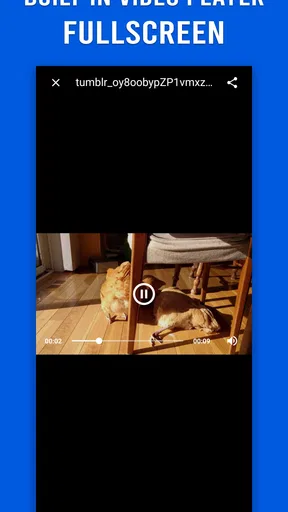
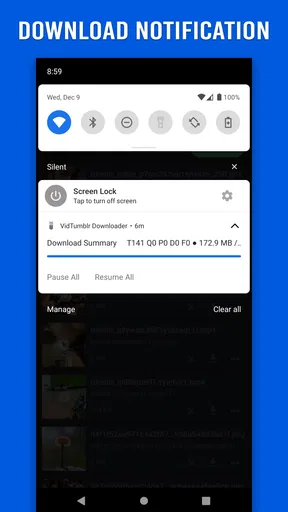
 Analysis by AppCompare
I tried Video Downloader for Tumblr as a focused tool for saving Tumblr videos, GIFs, and photos, and my first impression was that it understands a very specific need: getting favorite visual posts out of a fast-moving feed before they disappear into the scroll. It is not presented as a general video editor or a full media library. It belongs to the video players and editors category, but its practical role is much narrower—a downloader built around Tumblr content.
That narrow focus is both its appeal and its main limitation. If Tumblr is where you regularly discover clips, animated images, or photographs you want to revisit offline, the app can fit naturally into your routine. If you want trimming, captions, format conversion, cloud organization, or a downloader that works equally well across many social networks, I would look elsewhere instead of expecting this app to become something it was not designed to be.
What using it feels like in a real Tumblr routine
The most useful way to think about this app is as a quick capture step. I can imagine opening Tumblr during a commute, finding a short video that I want to show someone later, and saving it rather than relying on the original post remaining easy to locate. The same applies to GIFs and photos: the attraction is not creative editing, but keeping a local copy for later viewing.
That workflow is especially convenient for people who collect visual references. A designer might save a sequence of images for mood-board research, while a fan could keep favorite reaction GIFs together with personal files. Someone preparing a presentation or a private inspiration folder may also appreciate being able to gather several items in one session instead of handling each post through a separate workaround.
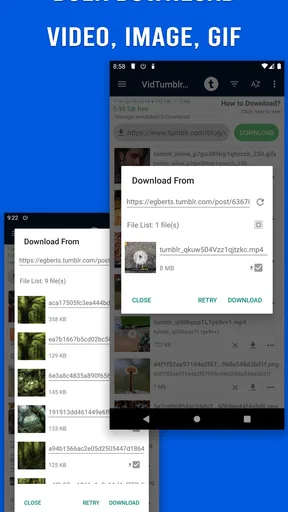
The store description highlights fast saving and bulk saving for GIFs and photos. I would treat the bulk option as the feature most likely to change how useful the app feels in practice. Saving one image occasionally is easy to do through many ordinary methods; selecting several related images in one visit is where a dedicated Tumblr downloader can justify its place on a phone.
There is a practical trade-off here. Bulk saving can reduce repetitive tapping, but it also makes it easier to collect material without reviewing each item carefully. I recommend pausing before a large save and checking whether the selected posts are genuinely wanted, especially when storage space is limited or when a Tumblr page contains a mixture of personal favorites and temporary browsing material.
A focused tool rather than a complete media suite
In my view, the app should be judged against the usual alternatives in two groups. The first group is Tumblr’s own saving and bookmarking behavior, which is better when you mainly want to return to a post while keeping its original context. The second group is general download or file-management tools, which may be more flexible across services but often require more manual steps and do not center the Tumblr experience.
Worth Reading Before You Choose

Baby Panda World Brings Quick Play to Modern Phones, but Its Game Library Feels Busy

ESPN’s Live Game View Makes Following Close Games Easier

QuizzLand Review: A Good Fit for Short Trivia Breaks, Not Every Player

Basketball Stars: Multiplayer Is Fast, but Can It Recover When Matches Go Wrong?

WEBTOON Turns Phone Updates Into a Better Reading Routine

Link to Windows Runs on Shared Habits, Not Social Feeds
This app sits between those choices. It is more direct than simply bookmarking something, because the purpose is to save the media itself. At the same time, it is less ambitious than a general-purpose editor. I would choose it when Tumblr is the source and quick local saving is the goal. I would not choose it as my main tool for managing a broad video collection from several platforms.
That distinction matters because downloaded media can lose the surrounding information that makes a post useful. A local file may not retain the caption, tags, comments, or creator context in the same convenient way as the original Tumblr post. For anything I may want to credit, cite, or find again, I would keep the original post accessible as well as saving the media.
Trust begins with visible choices
For a downloader, trust is less about a polished interface and more about what happens when I decide to save something. I want the app’s actions to be understandable: which item is being selected, whether a batch contains more than I intended, and where the resulting files are going. A fast button is useful only when it does not make the process feel opaque.
Video Downloader for Tumblr is developed by Angolix and is free to install. Its public store profile shows an average rating of 4.8 from around 1.6 thousand ratings, with about 129 written reviews and over 10 thousand installs. Those figures suggest that the app has attracted a real user base, but I would still read the recent comments before installing because downloader behavior can be affected by changes in the source service.
The app is marked for a Teen audience. That is a useful reminder that Tumblr content can vary widely and that saving something does not automatically make it appropriate to redistribute. I would use the tool for personal organization and offline access while respecting the creator’s rights and the expectations attached to each post.
The free entry point lowers the risk of trying it, although optional in-app purchases are listed at $1.99 to $2.99 per item. I would not pay immediately just to unlock the basic idea of downloading. First, I would confirm that the app handles the type of Tumblr content I actually save and that its workflow feels comfortable. A small purchase is easier to justify after the app has proved useful in my own routine.
Controls I would check before saving a collection
Before using any downloader repeatedly, I look for clear user controls rather than assuming that every saving action is harmless. I want to know what I selected, whether the app distinguishes videos from GIFs and photos, and whether a batch action can be stopped or reviewed. These details matter more than a flashy interface because a downloader’s main job is moving content from one place to another.
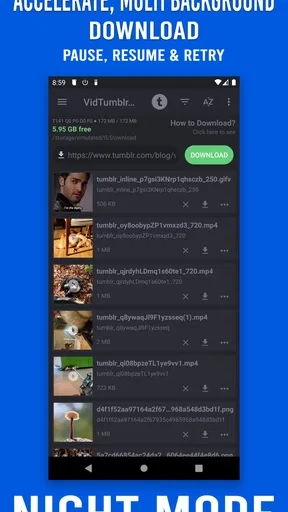
I would also pay attention to the destination shown by the app and to how easily I can identify saved files later. Even without a complicated library, sensible organization makes a difference. A folder filled with unnamed media quickly becomes difficult to manage, particularly when several posts contain similar images or short clips.
One useful habit is to save in small, clearly defined groups. Instead of downloading everything from a long Tumblr session, I would handle one theme or creator at a time, then review the result. This makes it easier to remove unwanted files and preserves a connection between the saved material and the reason I wanted it.
Another practical habit is to keep a note of the original Tumblr source for anything important. The downloader’s convenience should not replace attribution or context. If I save an artwork, a tutorial clip, or a creator’s photography, I would retain the post information separately so that a local copy does not become detached from its origin.
Where privacy and data sensitivity enter the picture
Downloading is a data-sensitive activity even when the content looks public. A saved file becomes part of the phone’s local collection, where it may appear in galleries, backups, search results, or shared folders depending on the device’s setup. I would therefore treat every download as a deliberate choice, not as a neutral tap.
The safest approach is to avoid saving private, restricted, or personally identifying material unless I have clear permission. Public visibility is not the same as permission to copy or redistribute. This is particularly important for photos of people, private conversations shown in screenshots, and posts that contain someone else’s work.
I would also review the app’s permission prompts and privacy information directly on the device and in the store before granting access. I do not assume that a downloader needs unlimited access to everything on my phone. If a request feels broader than the task requires, I would stop and reconsider. The right choice depends on the exact prompt shown by the current version, so I would rely on what is visibly presented rather than making assumptions.
The same caution applies to account controls. I would avoid entering Tumblr credentials into any screen that does not clearly explain why they are needed. For a simple saving workflow, I prefer choices that keep the process understandable and minimize unnecessary account exposure. If the app presents a sign-in or authorization step, I would read it carefully and use the official Tumblr route where available rather than treating a password request casually.
These checks are not signs that the app is unsafe; they are sensible habits for any tool that handles online media. The information available for this review confirms the developer, pricing structure, age classification, and store presence, but it does not give me a reason to make broader claims about permissions or data handling. I would verify those details on the current app page and inside the app before making it part of a sensitive workflow.
How I would use the bulk-saving feature responsibly
Bulk saving is most valuable when I already know what I want. For example, if I am collecting reference images for a small personal project, I would first browse Tumblr and identify a limited set of posts. Then I would use the batch function for that group, check the saved files, and remove anything that was selected by mistake.
I would avoid using bulk actions as a substitute for browsing carefully. A long feed can contain reposts, duplicates, or material that looks useful in the moment but has no later purpose. The more efficient the saving process becomes, the more important a review step is. Speed reduces effort, but it can also increase clutter.
For GIFs, I would remember that an animated image is not always interchangeable with a video. The format may behave differently in a gallery, messaging app, or editing program. If I need a specific format for a later project, I would test one or two files first rather than downloading a large batch and discovering that the destination app handles them poorly.
For photos, I would consider image ownership and quality before sharing them elsewhere. A local copy can be useful for personal reference, but reposting it may require permission or attribution. The app makes saving easier; it does not change the responsibilities attached to the content.
Compatibility, cost, and the practical decision to install
The current version is 26.1.6, and the app requires Android 7.0 or newer. That makes the operating-system requirement worth checking before installation, especially on an older spare phone. On a compatible device, the free price makes testing straightforward, but I would still leave room for the possibility that some conveniences may involve the listed optional purchases.
I would also keep expectations realistic about service compatibility. A Tumblr downloader depends on the way Tumblr presents media and on the app’s ability to process the current form of a post. A method that works smoothly today can require adjustment after changes to a website or app. If a particular post does not save correctly, I would not repeatedly retry without checking the source, the selected media type, and the app’s current instructions.
Storage is another overlooked issue. Short videos and batches of images can accumulate quickly, especially when I save several versions of similar content. I would periodically review the destination folder and remove files I no longer need. This is one reason I prefer a deliberate collection workflow over unrestricted saving.
People who need editing tools should be cautious about choosing this app for the wrong reason. Its category may place it near video editors in an app store, but the described purpose is downloading Tumblr media. If I needed cuts, transitions, subtitles, audio adjustments, or a polished export, I would use a dedicated editor after obtaining the media through an appropriate method.
Who will appreciate it, and who should skip it
I think this app is a good match for a Tumblr-heavy user who wants a straightforward way to keep favorite videos, GIFs, and photos on an Android device. It is also suited to people who value quick collection over advanced organization and who are willing to review their downloads responsibly.
I would recommend caution for anyone who expects a universal downloader, a professional media manager, or a privacy dashboard. It is not the right choice if your main need is cross-platform support, extensive file conversion, or detailed editing. In those cases, a broader tool may be more appropriate, even if it requires extra steps.
I would also skip it for sensitive material unless the current permission prompts, account behavior, and privacy information are clear enough for my comfort. A free app is not automatically the right app for confidential files. I would keep personal documents and private media outside a downloader workflow unless I fully understand the controls involved.
My measured verdict after weighing convenience against control
Video Downloader for Tumblr succeeds because it concentrates on a recognizable problem: saving Tumblr media without turning the task into a long manual process. The support for videos, GIFs, photos, and especially batch saving gives it a practical role for collectors and frequent Tumblr users. Its free availability also makes a cautious trial easy, while the strong average rating indicates that many users have responded positively.
My recommendation comes with boundaries. I would use it for selected, lawful, personal downloads, keep original post context for anything important, and inspect permissions and account prompts before trusting it with regular use. I would also review batches, monitor storage, and avoid assuming that a downloaded file is suitable for reposting.
The best reason to install it is focused convenience, not unlimited capability. If your everyday problem is losing track of Tumblr media you genuinely want to keep, this app is worth testing on a compatible Android device. If your priority is editing, cross-platform downloading, or maximum control over sensitive data, I would choose a more specialized alternative instead.
For my own use, that makes it a sensible utility rather than an essential all-purpose app. It earns a place when the source is Tumblr and the task is saving selected visual content. The moment the job expands beyond that, I would switch tools rather than force this one to cover needs it was never meant to handle.
Pros
- Downloads Tumblr videos for offline viewing.
- Simple interface that is easy to navigate.
- Supports saving videos directly to your device.
- Useful when mobile data or Wi-Fi is unavailable.
- Quick access to downloaded files within the app.
Cons
- May not download videos from private or restricted blogs.
- Download speed depends heavily on your internet connection.
- Contains ads that can interrupt the user experience.
- Saved files may lack useful names or organization options.
- Respect copyright and creator permissions when downloading content.
FAQs for Video Downloader for Tumblr
What is Video Downloader for Tumblr and how does it work?
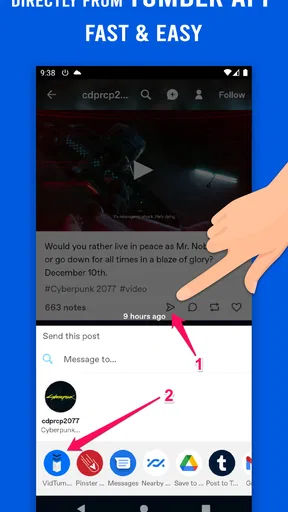
Video Downloader for Tumblr is an app designed to help users save videos shared on Tumblr to their mobile device. After copying a Tumblr post link or sharing it with the downloader, the app analyzes the URL and, when supported, offers available download options. Its exact process and supported formats may vary by version, device, and the original Tumblr post.
Can I download videos from every Tumblr post?
No. The downloader may not work with every Tumblr video. Posts can fail when they are private, restricted, deleted, protected by Tumblr’s access settings, hosted through an unsupported player, or shared without a direct media source. Some videos may also be unavailable because of regional restrictions or temporary server problems. It is best to use the app with publicly accessible posts and stable internet connections.
Where are downloaded Tumblr videos saved on my phone?
Downloaded files are generally stored in the app’s designated download folder, your device’s Movies or Videos directory, or a location selected during the saving process. On Android, you may find them through a file manager or the Gallery app, depending on the application’s settings. On iPhone, saved media may appear in the Photos app or inside the Files app if supported.
Is Video Downloader for Tumblr free to use?
The app may be available as a free download, but its features can depend on the specific version published in the app store. Free editions may include advertisements, usage limits, or optional premium tools. Before downloading, check the current store listing for in-app purchases, subscriptions, and permissions. Avoid unofficial copies, since they may contain unwanted software or misleading download claims.
Is it legal and safe to download Tumblr videos?
Downloading a video does not automatically give you permission to reuse, repost, edit, or distribute it. Always respect the creator’s copyright, Tumblr’s terms, and any licensing conditions attached to the content. Use the app for personal viewing only unless you have permission. Also review requested permissions, avoid entering sensitive account credentials, and download the application only from a trusted official source.


